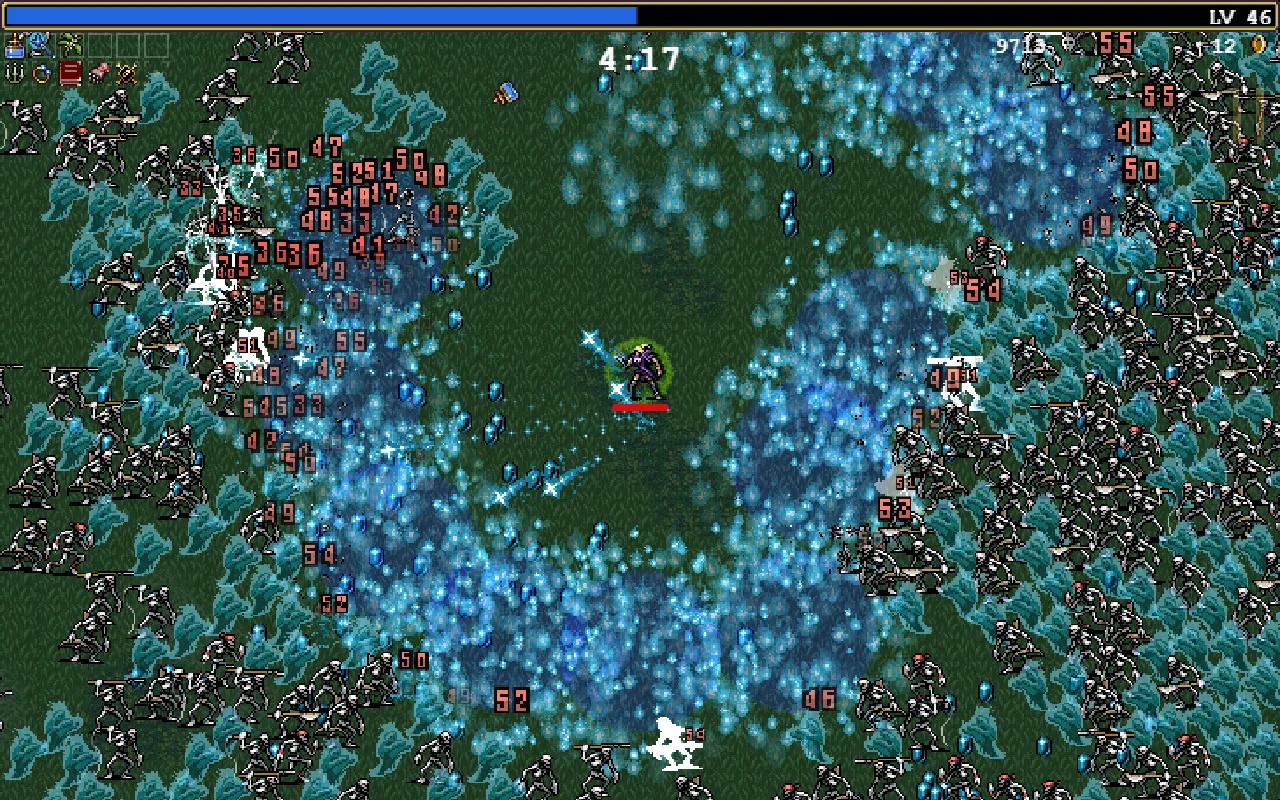
Bullet-heaven games like Vampire Survivors · Image: poncle
In 2026, building a horde survivor with AI takes roughly two hours from idea to a polished run you can share with a link. Chatforce helps you make visually high-quality 2D and 3D games from text and/or reference images, with hosting, multiplayer and microtransaction support taken care of for you. The workflow: pick an AI game maker with a built Horde Survivor engine, write a one-sentence brief (“a bullet-heaven where you play a caffeinated barista”), approve a concept screenshot, let Chatforce build auto-firing weapons, XP gems, and escalating enemy waves, then iterate in chat until the run arc feels tight.
This guide walks through every step, with the exact prompts and expectations you should have at each stage.
TL;DR: The Eight Steps
1. Pick a studio with a horde-survivor engine
An AI game maker that ships the genre template beats stitching single-tool generators together. You want auto-fire, XP gems, and level-up picks ready out of the box.
2. Write a one-sentence brief
Genre plus a hook. “A survivors game in a haunted hospital.” “A bullet-heaven where you play a caffeinated barista.” You don’t need more.
3. Answer follow-ups
Chatforce asks about art style, run length, and starting weapon feel. Two sentences each is plenty.
4. Approve the concept screenshot
A full-scene mockup showing the arena, enemies, XP gems, and HUD locks the art direction before any sprite is generated.
5. Let Chatforce build it
Chatforce builds the weapons and waves, makes the sprites and arena tiles, and adds an adrenaline track and sound effects, all at the same time.
6. Play the first build
Minutes later: a link with auto-fire weapons, escalating waves, and a level-up screen. Click it. Note what feels off.
7. Iterate in chat
Type plain-language fixes: weapon spread, enemy speed, upgrade balance. Chatforce updates the game at the same link.
8. Share the link
Friends play on a computer or phone. No install. Done.
The Steps in Detail
Pick an AI game maker with a built horde-survivor engine
To ship a complete survivors-like with AI, use an AI game maker that already ships a Horde Survivor engine template. Chatforce uses state-of-the-art AI models plus our own agent technology, so auto-fire weapons, XP gem logic, and escalating hordes come out coherent far faster than wiring single-tool generators together. Single-tool generators (Scenario for art, Suno for music) produce assets you would still have to wire into a game engine yourself.
Write a one-sentence brief
Describe the game in a single sentence: genre plus a hook. Examples: “A survivors game in a haunted hospital where the enemies are restless nurses.” “A bullet-heaven where you play a caffeinated barista hurling espresso shots at endless customers.” Specificity sharpens every downstream decision; perfection is not required. When you create the game, pick 2D or 3D; that choice is locked for the build.
Answer Chatforce’s clarifying questions
Chatforce asks 2 to 3 follow-ups: art style (pixel-art vs. hand-drawn), run length target (5-minute sprint vs. 20-minute marathon), and difficulty curve. For a survivors-like, it will also ask about starting weapon feel and how many upgrade picks you want per level-up. Answer briefly.
Approve the concept screenshot
Before making any sprite, Chatforce draws a full-scene concept screenshot showing the arena, the character mid-run, a wave of enemies, floating XP gems, and the HUD. This locks the visual direction. Approve it, or ask for a revision (“darker horror palette,” “more pixel-art-feel”). Every asset made after this moment matches the approved reference, so the gems, enemies, and upgrades all look like they belong together.
Let Chatforce build the game
Chatforce builds the Horde Survivor game: auto-firing weapons, escalating enemy spawn rates, XP gem drops, a level-up upgrade screen, evolving weapons, and a run timer with scaling difficulty. It makes the character sheet, enemy sprites, weapon projectiles, gem pickups, arena tiles, and UI elements in one consistent style. It also composes an original adrenaline track plus hit, death, level-up, and gem-pickup sound effects, so the sounds fire at the right moments and the music matches the pace of the run.
Play the first build
In about 10 to 15 minutes you have a link. Click it and play the first build. It will have a starting weapon that auto-fires, enemies that spawn in escalating waves, XP gems that drop and pull toward the player, a level-up screen with upgrade picks, and a run timer. Note what feels off. Common first-build notes: weapon spread too tight, first-minute pacing too slow, gem magnet range too short.
Iterate in chat
Type plain-language revisions: “The enemies feel too slow in the first two minutes.” “Add a second starting weapon that chains lightning.” “The level-up screen needs a fourth upgrade option.” “Make the XP gems magnetic from further away.” Chatforce updates the game at the same link. You can also shape the arena yourself in the Level Editor, custom-made for your game. Repeat until the run feels tight, from the opening sprint through the mid-run power spike to the final-minute chaos.
Share the link
When the run feels right, share the link. Friends play on a computer or phone. No install, no download. Post it to a game jam, share it in a Discord server, or link it in your portfolio.
Six Things That Trip People Up
Using a studio without a horde-survivor engine
Generic AI code generators will attempt to build the survivor loop from scratch on each run. A studio with a pre-built Horde Survivor engine template ships reliable auto-fire, XP gems, and escalating difficulty immediately. Check before you commit.
Overscoping the brief
“Survivors with 10 weapon evolutions, online co-op, and a meta-progression shop” will stall. “A bullet-heaven where you play a caffeinated barista” will ship. Add evolutions and depth in iteration, not in the brief.
Skipping the concept screenshot
If you let Chatforce make enemy sprites before approving a full-scene concept, the art ends up as a collage of unrelated styles. A dark horror arena with cartoony pixel enemies looks wrong. Approve the concept first; every asset flows from it.
Treating difficulty tuning as a code problem
In a survivors game, difficulty is a systems problem: spawn rate, enemy speed, XP drop values, and upgrade power all interact. Describe the feeling you want (“the first three minutes should feel manageable, then it spikes”) and let Chatforce adjust the curve.
Asking for thousands of simultaneous enemies
If you need thousands of on-screen enemies at native-engine performance, a custom Unity build will push further. For a 2D or 3D horde survivor you can share as a link, the Chatforce workflow is faster than building a custom engine from scratch.
Stopping after the first build
The first build has the mechanics. The fun comes from iteration: tightening the run arc, adding a boss wave, tuning the upgrade pool, adjusting the music tension. The cost of a chat revision is minutes. Use it.
Tools for Making a Survivors Game with AI, Compared
Every Chatforce game gets a shareable link that plays on computers and phones.
Approach
Chatforce
Rosebud AI
Single-tool stack
Claude / ChatGPT + engine
Built horde-survivor engine template
Yes, ships day one
Partial
No, build from scratch
You write it
Auto-fire, XP gems, level-up screen
Yes, in template
Partial
No
Requires prompting
Weapon evolution support
Yes, via chat
Limited
No
Manual
AI that builds the whole game
Yes, state-of-the-art AI models plus our own agent technology
Don’t Take Our Word for It: Play What Chatforce Built
Every claim on this page is checkable. These are real games made on Chatforce by real creators, hosted at public links. Tap one and you’re playing in seconds, in your browser, which is the whole point.
Grave GardenTower Defense · built with Chatforce, playable right hereOpen full screen ↗
Can AI make a real survivors-like game, not just a prototype?
Yes. Chatforce’s Horde Survivor engine ships the full genre loop: auto-firing weapons, escalating enemy hordes, XP gem drops, a level-up upgrade screen, weapon evolution, a run timer, and scaling difficulty. The output is a finished game with its own link that plays on computers and phones, not a tech demo.
Does the AI handle auto-firing weapons and enemy waves automatically?
Yes. Chatforce builds the auto-fire weapons, enemy spawn rates, and difficulty scaling from the genre template. You describe the feel you want (“tight spread,” “homing projectiles”) and Chatforce adjusts the game.
Can I get weapon evolution (like in Vampire Survivors)?
Yes. The Horde Survivor engine supports weapon evolution. Describe the evolved form in chat: “when the garlic reaches max level and the pummarola is equipped, they combine into the Soul Eater.” Chatforce adds the condition and makes the evolved-weapon sprite.
How long does a survivors run in the AI-built game last?
The run length is configurable. Chatforce will ask during setup. Common targets are 10 to 15 minutes for a casual run or 20 to 30 minutes for a marathon. Difficulty scaling and the run timer are both adjustable at any point via chat.
Can I add a boss at the end of the run?
Yes. Tell Chatforce “add a boss wave at the 15-minute mark” and it adds the boss wave, makes the boss sprite sheet, and writes a boss-entry music sting. All three updates ship to the same link.
Do I need to code the horde logic myself?
No. Chatforce handles all game logic. You describe behavior in plain English: “enemies speed up every two minutes” or “spawn a mini-boss when the timer hits five minutes.” If you want to read or adjust the code, you can, but it is not required.
What is the one case where a traditional engine beats Chatforce for survivors?
If you need thousands of on-screen enemies at native-engine performance, a custom Unity build will push further. For a 2D or 3D horde survivor you can share as a link, the Chatforce workflow is faster than building a custom engine from scratch.
How much does it cost to make a survivors game with AI?
There is a free version: the Creator Program is free to join and includes 2,000 welcome chips plus 1,200 chips a day. Paid plans start at $19.99/month (Beginner, 1,800 chips a month); Pro is $44.99/month for 4,200 chips, and chip packs start at $6.99 for 500 chips. There is no per-asset cost; you talk to Chatforce and it builds the game.
Start Step 1 Now
Open Chatforce. Type one sentence about your survivors game. Chatforce builds the horde, the weapons, and the music. You play the result from a shareable link on a computer or phone.
/icon_text_light_svg.svg)